
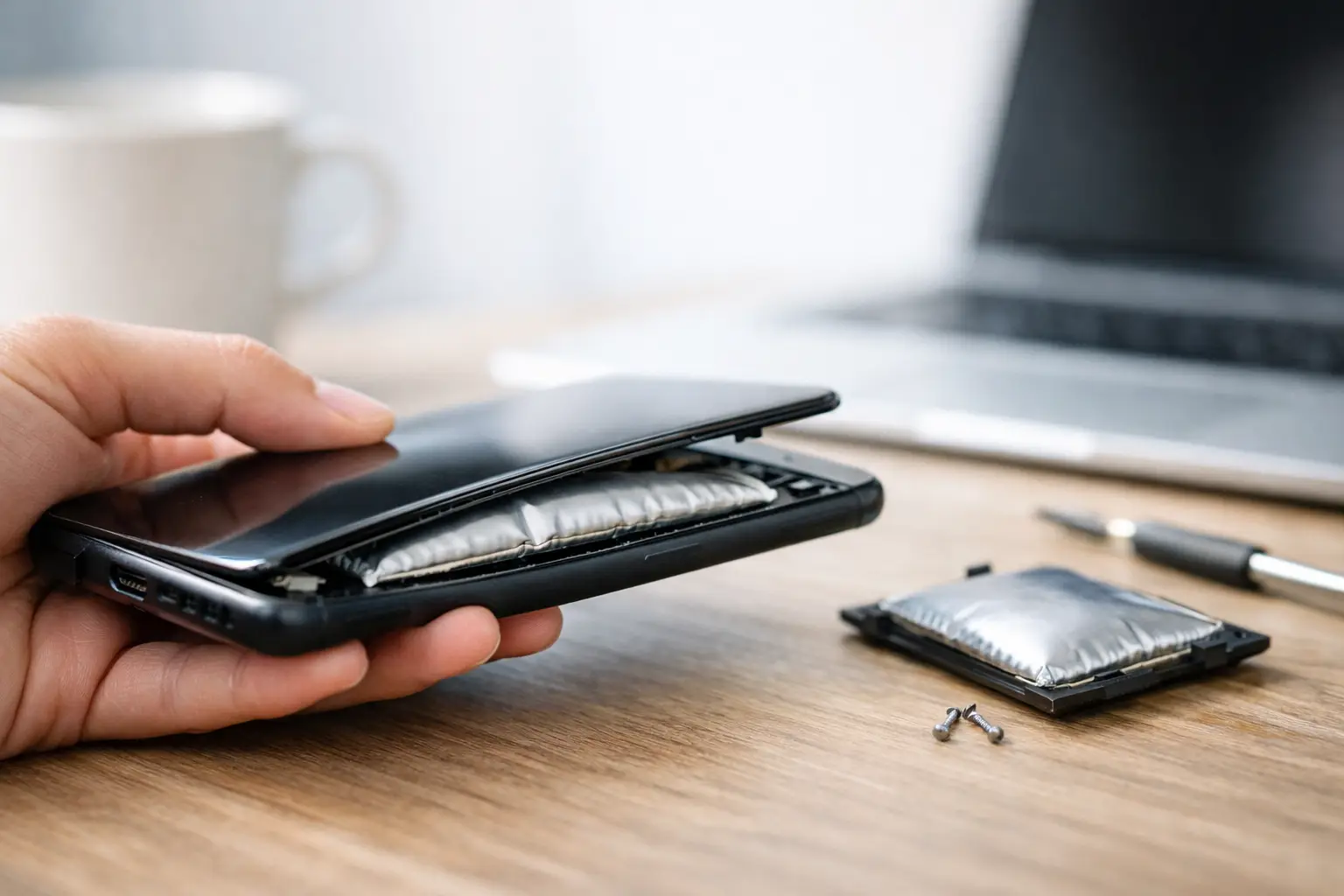
A phone that suddenly will not sit flat on a table, has a screen lifting from the frame, or feels thicker than usual needs attention now. If you are asking, why is my phone swelling, the likely answer is a damaged or failing lithium-ion battery. Stop using it, do not try to press the phone back together, and arrange a professional battery inspection as soon as possible.
A swollen battery is not just an annoying repair issue. The battery is expanding from internal gas buildup, and that pressure can crack your screen, bend the frame, damage internal components, or create a fire risk if the battery is punctured or overheated.
Why Is My Phone Swelling?
Most modern phones use lithium-ion batteries. They store a large amount of energy in a very thin space, which is why they can provide all-day power without making your phone excessively heavy. But batteries age, and their internal chemical materials gradually break down through normal charging and use.
When that breakdown becomes severe, gases can form inside the sealed battery pouch. Since the pouch has nowhere else to expand, it swells. The battery may push the display upward, separate the back glass, or make the phone feel rounded and uneven.
A swollen phone battery is not always caused by something you did wrong. Batteries are wear items. Still, heat, charging habits, physical damage, and water exposure can speed up the failure.
Battery age and charge cycles
Every battery has a limited useful life. A charge cycle is roughly the equivalent of using 100% of the battery’s capacity, whether that happens in one day or across several partial charges. After hundreds of cycles, the battery holds less power and is more likely to become unstable.
You may notice warning signs before swelling becomes obvious: battery life drops quickly, the phone shuts down while it still shows charge, charging takes longer, or the device gets hot during ordinary use. Those symptoms do not guarantee the battery is swollen, but they are good reasons to have it checked before the problem gets worse.
Heat is hard on phone batteries
Leaving a phone in a hot car, using it under a pillow, gaming for hours while charging, or charging it in direct sunlight can raise battery temperature. One hot day may not cause a battery to swell. Repeated high heat over time is the bigger problem because it accelerates chemical aging.
Fast charging can also make a phone warm, especially during the first part of the charge. That is normal within limits. It is not normal if the phone becomes too hot to comfortably hold, gives repeated temperature warnings, or gets unusually hot even when it is not charging.
Damage, moisture, and poor-quality chargers
A hard drop can damage the battery or the connector components around it. Water damage may corrode internal parts and lead to charging problems that place extra stress on the battery. Swelling can appear days or weeks after an incident, so do not assume an older drop or splash is unrelated.
Cheap, damaged, or uncertified charging cables and power adapters can also contribute to heat and inconsistent charging. A reputable charger does not make a worn-out battery new again, but it helps reduce unnecessary strain. If your cable is frayed, loose, or gets hot at the connector, replace it.
What to Do Immediately If Your Phone Battery Is Swollen
Treat the device gently. Do not keep using it until the battery can be inspected.
First, unplug the phone if it is charging. If you can turn it off without squeezing, bending, or forcing the phone, power it down. Avoid repeated attempts to turn it on or charge it just to save a few more photos or messages.
Set the device on a nonflammable, flat surface away from paper, clothing, bedding, pets, and direct sun. Tile, concrete, or a clear metal surface is better than a couch, bed, or car seat. Keep it in a cool, dry area until you can take it in for service.
Do not put a swollen phone in the freezer. Extreme cold does not repair the battery and can create condensation inside the device. Do not put it in water, cover it tightly, or store it in a sealed drawer. Most of all, do not puncture, cut, crush, bend, or attempt to flatten the battery. A punctured lithium-ion battery can release irritating chemicals, smoke, or ignite.
If the phone is smoking, hissing, leaking, or extremely hot, move away from it and contact local emergency services. Do not handle a battery that appears to be actively failing unless you must move away from an immediate danger.
Is It Really a Swollen Battery or Just a Loose Screen?
A lifted screen can sometimes come from a failed adhesive seal after a drop, heat exposure, or a previous repair. But you should never assume that is the cause. A swelling battery can look exactly like a loose display at first.
Look for a growing gap around the screen or back cover, pressure marks on the display, a phone that rocks on a flat table, or buttons that feel misaligned. If the gap seems to be getting larger, treat it as a battery issue. Avoid pressing around the edges to test it. Pressure can damage the screen or battery beneath it.
A technician can open the device safely, confirm whether the battery has expanded, and check whether the screen, frame, charging port, or internal cables were damaged by the pressure. On some phones, replacing the battery is straightforward. On others, the display or back glass may also need attention. The right repair depends on how long the swelling has been present and whether the battery has pushed other parts out of place.
Can a Swollen Phone Battery Be Repaired?
The battery itself cannot be repaired or safely reused. It needs to be removed and replaced with a quality, compatible battery. A proper repair also includes checking the device for secondary damage, reinstalling the screen or back cover correctly, and testing charging, cameras, buttons, speakers, and wireless functions before the phone goes back into daily use.
The trade-off is simple: waiting might seem cheaper, but swelling can turn a battery replacement into a battery-plus-screen repair. It can also make the phone unsafe to transport or use. Acting early usually protects more of the device.
If your phone is still working, you may be tempted to back it up first. Only do that if it can be done without charging, heating, or continuing to use a visibly swollen device. If the phone is already powered on and cool, a quick wireless backup may be reasonable. If it needs to be plugged in, is hot, or is visibly separating, skip the backup and prioritize safety. A repair shop can discuss data options after evaluating the device.
How to Prevent Another Swollen Battery
No charging routine can make a battery last forever, but a few habits can reduce wear. Keep your phone out of high heat, remove a thick case if it consistently gets hot during charging, and avoid using damaged cables or adapters. Do not charge the phone under blankets or pillows, where heat cannot escape.
It also helps to replace a weak battery before it becomes a major problem. If your phone drains rapidly, heats up during simple tasks, or has become unreliable after a few years of use, a battery test is often more practical than waiting for a full failure. Replacing a battery can cost far less than replacing the entire phone, especially if the screen and other components are still in good shape.
For customers around Warner Robins and Middle Georgia, Reboot Hub can inspect swelling-related damage and replace failing phone batteries with fast, warranty-backed service. A trained technician can tell you whether the issue is limited to the battery or whether the expanding cell has affected other parts of the phone.
A Swollen Phone Is a Same-Day Problem
Do not panic, but do not put this repair off. A phone battery does not swell because it needs a software update or because the case is too tight. It is a physical failure that needs safe handling and a professional replacement. Set the device aside, keep it away from heat and pressure, and get it inspected before a small gap in the screen becomes a bigger problem.